Experiencing the dreaded 'Roblox website down' message can halt your gaming fun, especially for busy adults balancing life and leisure. This comprehensive guide offers immediate steps and practical solutions to determine if Roblox is down globally, troubleshoot common connection problems on your end, and get back into your favorite experiences faster. Discover how to check official server status, understand why outages occur, and optimize your setup for stable gameplay. Learn to distinguish between a widespread server issue and a localized problem affecting just your device, ensuring you spend less time frustrated and more time enjoying the vast world of Roblox. We delve into effective fixes for PC and mobile users, provide resources for real-time updates, and offer tips for making the most of your gaming time, even during unexpected downtime. Navigate network glitches and application errors with confidence, ensuring your gaming sessions remain as seamless as possible.
Is the Roblox Website Down Globally Right Now?
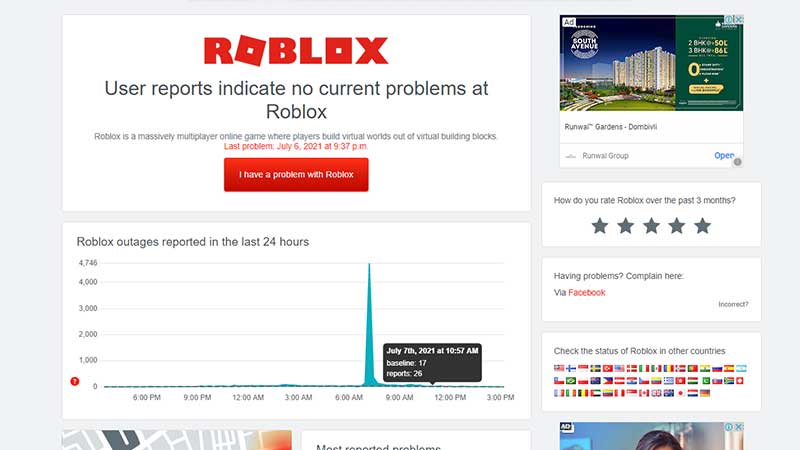
The most reliable way to check if the Roblox website is down globally is to visit official status pages like status.roblox.com or reputable third-party trackers such as Downdetector.com. These sites aggregate real-time user reports and official announcements, quickly indicating if the issue is widespread across the US or limited to specific regions. A sudden spike in reported problems on these platforms is a strong indicator of a global service interruption.
Why Am I Seeing A 'Roblox Not Working' Message When Others Aren't?
If others can play but you're seeing a 'Roblox not working' message, the problem is likely localized to your internet connection, device, or network settings. Common culprits include a weak Wi-Fi signal, an outdated Roblox app, corrupted game files, or interference from your firewall or antivirus software. Basic troubleshooting like restarting your router or clearing your app's cache often resolves these personal connectivity issues.
How Do I Troubleshoot Roblox If It's Down On My PC?
To troubleshoot Roblox being down on your PC, start by restarting your router and modem, then flush your DNS cache and renew your IP address via Command Prompt. Ensure your Roblox application and network drivers are updated. Temporarily disabling your firewall or antivirus to check for interference is also recommended. Clearing Roblox’s local temporary files can often resolve corrupted data issues preventing connection.
What Should I Do If Roblox Is Down On My Mobile Device?
If Roblox is down on your mobile device, first restart your phone or tablet and verify your internet connection (Wi-Fi or mobile data). Check the app store for any pending updates to the Roblox app. If problems persist, try clearing the app’s cache and data through your device settings, or as a last resort, uninstall and reinstall the Roblox app completely to ensure a fresh installation.
Are There Any Quick Fixes For Roblox Connection Issues?
Yes, several quick fixes for Roblox connection issues include restarting your internet router, restarting your gaming device, ensuring your Roblox app or browser is updated, and clearing your web browser's or app's cache. For PC users, flushing your DNS can also provide a quick refresh. These simple steps often resolve temporary network glitches or software conflicts rapidly.
Who Can I Contact If Roblox Remains Down For Me?
If Roblox remains down for you after trying all troubleshooting steps, and global status indicates it's operational, you should contact Roblox Support through their official website. Provide detailed information about the issue, including error messages, steps you've already taken, and your device specifications. This helps their support team diagnose more complex, account-specific, or network-specific problems you might be encountering.
When Is The Best Time To Check For Roblox Server Status Updates?
The best time to check for Roblox server status updates is immediately when you encounter an issue and then periodically if the problem persists. Check official channels like the Roblox Status page and their social media accounts, as well as third-party aggregators. During a major outage, check every 30-60 minutes for new information; constant checking won't speed up resolution but can increase frustration.
There’s nothing quite like settling down after a long day of work, family commitments, and adulting, ready to dive into a few rounds of your favorite game on Roblox, only to be met with a frustrating 'website down' message. For the average US gamer, who often balances a full life with their passion for gaming, these unexpected interruptions aren’t just minor inconveniences—they’re a direct hit to precious relaxation time. Many of us, part of the 87% of US adults who regularly game, spending an average of 10+ hours a week, rely on platforms like Roblox for social connection, creative expression, and pure fun. When the Roblox website is down, it can feel like a sudden stop to our digital escape.
This isn't just about kids missing out on their favorite games; it's about adults, often in their mid-30s, who see gaming as a vital part of unwinding and connecting with friends or family. You value your gaming setup, you invest time into finding good value for your money, and you want everything to just work. This guide is built specifically for you. We’ll cut through the confusion and provide practical, no-nonsense solutions to help you figure out if Roblox is genuinely down, what might be causing the issue, and how to get back into the game as quickly as possible. Consider this your go-to resource for troubleshooting Roblox outages, designed to save you time and get you back to building, adventuring, and socializing.
How Do I Check If Roblox Is Actually Down Globally?
The first step when you suspect the Roblox website is down is to verify if it’s a widespread outage or a problem isolated to your connection. This crucial distinction helps you focus your troubleshooting efforts. Instead of repeatedly refreshing your browser, there are more reliable ways to check Roblox’s global server status. Many US gamers, keen on staying informed, will turn to dedicated status checker websites first.
- Official Roblox Status Page: Roblox maintains its own status page. While not always immediately updated during a sudden crash, it's the most authoritative source for planned maintenance or major, acknowledged outages. Search for 'Roblox Status' on Google to find it.
- Third-Party Status Websites: Sites like Downdetector.com or IsItDownRightNow.com aggregate user reports from around the world. These sites provide real-time graphs showing reported problems and often have comment sections where other users confirm outages. A sudden spike in reports is a strong indicator of a widespread issue.
- Social Media: Twitter (or X), Reddit, and Discord are invaluable resources. Search for '#RobloxDown' or check the official Roblox Twitter account and popular Roblox subreddits. The gaming community is quick to report and discuss outages, providing a rapid source of information from fellow players.
By consulting these sources, you can quickly ascertain whether the issue is impacting everyone or just you, allowing you to move on to the appropriate troubleshooting steps.
Why Does The Roblox Website Go Down Sometimes?
Understanding the common culprits behind Roblox outages can demystify the experience and manage expectations. For platform as massive as Roblox, which supports millions of concurrent users and a vast universe of user-generated content, downtime is an inevitable part of operating at scale. It's not usually a sign of neglect, but rather a reflection of complex technical challenges.
Major outages often stem from a few key areas. Server overload is a frequent cause; if an unexpected surge in players or a popular new experience overwhelms Roblox’s infrastructure, it can lead to slowdowns or crashes. Technical glitches, such as database errors, network routing problems, or software bugs within Roblox’s core systems, can also bring the platform to a halt. Sometimes, these issues are triggered by routine updates or new feature rollouts that encounter unforeseen compatibility problems. Furthermore, cybersecurity incidents, like distributed denial-of-service (DDoS) attacks, can deliberately target Roblox’s servers, making them inaccessible. While Roblox invests heavily in robust infrastructure and security, the sheer scale and complexity mean occasional disruptions are unavoidable for even the most well-managed online services.
What Are Common Reasons Roblox Might Seem Down For Just Me?
If global status checkers show Roblox is operational, but you still can't connect, the problem likely lies on your end. This is a common scenario for many gamers who are trying to squeeze in some playtime during a lunch break or after putting the kids to bed. Pinpointing the exact cause can save a lot of frustration. These localized issues are often solvable with a few straightforward checks.
- Internet Connection Problems: The most common culprit. A weak Wi-Fi signal, a temporarily disconnected Ethernet cable, or an issue with your internet service provider (ISP) can prevent you from reaching Roblox.
- Outdated App or Browser: Ensure your Roblox application on PC or mobile, or your web browser if playing via the website, is fully updated. Outdated versions can lead to compatibility issues with Roblox’s servers.
- Corrupted Cache/Data: Over time, cached data in your browser or the Roblox app can become corrupted, leading to connection failures. Clearing this data can often resolve the issue.
- Firewall or Antivirus Interference: Your security software might be mistakenly blocking Roblox’s connection. This is particularly common after a software update or a new installation.
- VPN/Proxy Issues: If you're using a VPN or proxy server, it might be routing your connection through a server that's experiencing issues or is blocked by Roblox.
- DNS Problems: Your computer’s Domain Name System (DNS) resolver might be having trouble finding Roblox’s servers. Switching to a public DNS (like Google DNS) can sometimes help.
By systematically checking these potential issues, you can often diagnose and fix the problem without needing to wait for a widespread Roblox server restoration.
How Can I Troubleshoot Roblox Connection Issues On My PC?
For PC gamers who rely on Roblox for social play and unwinding, a connection issue can feel like a major roadblock. Thankfully, there are several effective troubleshooting steps you can take to get back into the action. Remember, patience and a systematic approach are key.
- Restart Your Router and Modem: This is the golden rule of internet troubleshooting. Unplug both your router and modem from power, wait 30 seconds, then plug them back in. Allow a few minutes for them to fully restart and re-establish a connection. This often resolves minor network glitches.
- Clear Roblox Cache: Go to your Windows search bar, type 'Run', and open the Run dialog. Type '%localappdata% oblox emp' and press Enter. Delete all files and folders within this directory. This clears potentially corrupted temporary files.
- Flush DNS and Renew IP: Open Command Prompt as an administrator. Type 'ipconfig /flushdns' and press Enter. Then type 'ipconfig /release' and press Enter, followed by 'ipconfig /renew' and Enter. This refreshes your network configuration.
- Check Firewall/Antivirus Settings: Temporarily disable your firewall or antivirus and try launching Roblox. If it works, you'll need to add an exception for Roblox in your security software. Remember to re-enable your security software immediately after testing.
- Update Network Drivers: Ensure your PC's network adapter drivers are up to date. You can usually find these on your computer manufacturer's website or through Windows Device Manager.
- Try a Different DNS Server: Consider switching to public DNS servers like Google DNS (8.8.8.8 and 8.8.4.4) or Cloudflare DNS (1.1.1.1 and 1.0.0.1). Instructions vary by operating system, but a quick search for 'change DNS Windows 10' will guide you.
These steps cover most common PC-specific connection problems and are designed to get you back to enjoying Roblox without extensive technical knowledge.
What Steps Should I Take If Roblox Is Down On Mobile Devices?
Mobile gaming is huge, with many US gamers, particularly younger adults, preferring to game on the go or unwind with a mobile title. Roblox’s mobile presence is massive, making mobile connection issues just as frustrating as PC problems. If you're trying to access Roblox on your smartphone or tablet and encountering issues while others are playing, these mobile-specific steps can help.
- Restart Your Device: A simple restart can often clear temporary glitches and refresh network connections on your phone or tablet.
- Check Your Internet Connection: Ensure you have a stable Wi-Fi or mobile data connection. Try opening other apps or websites to confirm your internet is working correctly. If on mobile data, check your data cap or signal strength.
- Update the Roblox App: Go to your device's app store (Google Play Store for Android, Apple App Store for iOS) and check for any pending updates for the Roblox app. Outdated apps can cause connection issues.
- Clear App Cache and Data: On Android, go to Settings > Apps > Roblox > Storage > Clear Cache and Clear Data. On iOS, you might need to offload or reinstall the app to clear its data effectively. (Note: Clearing data might log you out, so have your credentials ready.)
- Disable VPN (if used): If you're using a VPN on your mobile device, try disabling it temporarily to see if it's interfering with Roblox's connection.
- Reinstall the Roblox App: As a last resort, uninstall the Roblox app completely, restart your device, and then reinstall it from the official app store. This ensures you have a fresh, uncorrupted installation.
These mobile troubleshooting steps are generally quick and can often resolve common localized issues, getting you back to your experiences efficiently.
Are There Official Roblox Channels To Follow For Real-Time Updates?
Staying informed during a Roblox outage is crucial for gamers who value their time and want to get back to their social gaming or skill-building. While third-party sites are great for initial checks, official channels provide the most accurate and up-to-date information directly from the source. Knowing where to look means you won't be left guessing.
- The Official Roblox Status Page: As mentioned, this is Roblox’s primary hub for official server status information. bookmark it for quick access.
- Roblox Twitter Accounts: Follow the main @Roblox account, and often, specific developer accounts or support accounts might retweet or post updates during major incidents. Twitter has become a de facto real-time alert system for many online services.
- Official Roblox Blog: While not for real-time minute-by-minute updates, the blog can sometimes provide post-mortem analyses of major outages or announce upcoming maintenance that might affect service.
- Roblox Support Pages: The support portal often has articles related to common issues and may be updated with banners or announcements during widespread problems.
By keeping an eye on these official channels, you'll be among the first to know when Roblox is experiencing issues and when they expect service to be restored. This proactive approach allows busy gamers to plan their time, perhaps opting for an offline game or another activity until Roblox is back online.
How Do Roblox Outages Impact In-Game Purchases And Game Progress?
For many adult gamers, especially those balancing budgets with their love for gaming, questions about in-game purchases and progress during an outage are significant. Nobody wants to lose hard-earned Robux or see their progress in a game evaporate because of server downtime. Roblox, like most major online platforms, has robust systems in place to minimize such losses, but understanding the nuances can ease worries.
- Robux Purchases: Typically, if you initiated a Robux purchase just before or during an outage, the transaction might be delayed. However, successful purchases are usually processed once servers are stable. If Robux don't appear after services resume, contact Roblox Support with your transaction details. The system logs these transactions securely, even if the display is delayed.
- Game Progress and Saves: Most Roblox experiences save progress server-side. This means that if you were playing a game and Roblox went down, your last saved progress should be intact and load correctly once the platform is back online. There's a minimal risk of losing progress, especially in games that frequently auto-save. However, any actions taken in the immediate seconds before a crash that weren't saved to the server might not be reflected. Developers often implement redundant saving mechanisms to prevent significant data loss.
- Premium Subscriptions: Your Premium subscription status is tied to your account and billing cycle, independent of server uptime. You won't lose your subscription or benefits due to an outage, though you obviously won't be able to access them until Roblox is operational again.
Rest assured, Roblox is designed to protect user data and purchases, making data loss during outages a rare and usually recoverable event. Your investment in time and money is generally safe.
What Should I Do While Waiting For Roblox To Come Back Online?
When Roblox is confirmed to be down, and you’ve done all you can, the best approach is to pivot. For gamers who use their limited free time strategically, having a backup plan is a smart move. Instead of repeatedly checking the server status, consider these productive or enjoyable alternatives.
- Explore Other Games: This is an excellent opportunity to dive into your backlog, try a free-to-play title you’ve been curious about, or revisit a classic. Many gamers find joy in discovery or re-engaging with single-player experiences that don't rely on online servers.
- Catch Up on Gaming Content: Watch gaming streams on Twitch, YouTube, or Facebook Gaming. Catch up on esports highlights or watch a review of a new title. This can be a relaxing way to stay engaged with gaming culture without needing to play.
- Connect Offline: Spend time with family, tackle a chore, read a book, or go for a walk. Sometimes a forced digital detox can be a refreshing change of pace, especially for those balancing gaming with a busy life.
- Community Engagement: If you’re part of a gaming Discord server, chat with friends, share memes, or plan future gaming sessions for when Roblox is back online. Socializing within the gaming community doesn't always require being in-game.
- System Maintenance: Use the downtime to perform some quick PC or console maintenance. Clear disk space, update other drivers, or organize your game library. This way, your system will be primed and ready when Roblox returns.
Remember, gaming is about enjoyment and relaxation. A temporary outage is a chance to explore other facets of your hobbies or life, ensuring your overall gaming experience remains positive and balanced.
FAQ
How often does Roblox experience major outages?
Major Roblox outages, which affect a significant portion of users globally, are relatively infrequent but can occur a few times a year. Minor, localized issues are more common. The platform's massive scale means even small technical glitches can impact many. Roblox continuously works to improve server stability and resilience, especially as player counts and content creation grow exponentially. They prioritize quick resolution during downtime.
Can I get a refund for Robux if Roblox is down?
Generally, refunds for Robux are not issued solely because Roblox experienced downtime. Robux purchases are tied to your account, and access resumes once services are restored. If you believe there was an error in your purchase during an outage, or if the Robux were never credited even after the platform was stable, you would need to contact Roblox Support with specific transaction details for assistance.
Does VPN usage affect Roblox connection during an outage?
Yes, VPN usage can both help and hinder during a Roblox outage or connectivity issues. If a specific server region is experiencing problems, routing your connection through a VPN server in a different, stable region *might* help. However, a VPN can also introduce its own latency or connectivity issues. If you suspect a VPN is causing problems, try disabling it to see if your direct connection to Roblox improves.
What is the typical duration of a Roblox server downtime?
The duration of Roblox server downtime varies greatly. Minor glitches might be resolved within minutes to an hour. Major outages, particularly those caused by complex technical issues or widespread infrastructure problems, can last several hours, and in rare cases, extend for a full day or more. Roblox's communication channels typically provide estimated resolution times when available, allowing players to plan accordingly.
Is Roblox still growing despite occasional downtime?
Absolutely. Despite occasional downtime, Roblox continues to experience significant growth, especially among Gen Z and millennial audiences who appreciate its social, creative, and free-to-play aspects. The platform's commitment to user-generated content, diverse experiences, and cross-platform accessibility (mobile and PC/console cross-play are key trends) ensures its continued relevance and expansion in the US gaming market. Outages are seen as part of managing a dynamic, evolving online ecosystem.
In the vast and ever-evolving landscape of online gaming, encountering the 'Roblox website down' message is a shared experience for many. But with the right knowledge and tools, it doesn't have to ruin your precious gaming time. From quickly checking global server status to methodically troubleshooting your own setup, you now have a comprehensive guide to navigate these frustrating moments. Remember, for busy adult gamers, efficient problem-solving means more time enjoying the experiences you love, connecting with friends, and unwinding. So next time Roblox seems to be taking an unexpected break, you'll be prepared, calm, and ready to get back into the game as soon as possible. What's your biggest gaming challenge when servers go down? Comment below and share your tips!
Immediate steps to check Roblox status; Understand common causes for downtime; Troubleshooting guides for PC and mobile; Official channels for real-time updates; Tips for managing connection issues; How outages impact gameplay; Maximizing gaming time.
35


Roblox Website Down 503 Roblox Application And Website Bugs . Is Roblox Shutting Down In 2026 Latest Updates Roblox Shutting Down 768x560 . Is Roblox Getting Shut Down In 2026 The Real Truth Behind All Those Is Roblox Getting Shut Down In 2026 1024x683 . Are Roblox Servers Down Check Server Status 2026 Roblox . Is Roblox Getting Shut Down In 2026 The Real Truth Behind All Those Roblox Moderation System Changes Impact 2026 1024x572



Roblox Error Hari Ini Atau Is Roblox Down Ini Solusi Koneksi Di Tahun 1485943021 . Why Is Roblox Down Right Now What S Happening Roblox Is Down 1.webp. Roblox Website Down 503 Roblox Application And Website Bugs . Roblox Down Or Lagging Guide Roblox. Is Roblox Getting Shut Down In 2026 The Real Truth Behind All Those Roblox Error 277 Thumbnail




Is Roblox Down Right Now Issues Roblox Not. Roblox Shutting Down In 2024 Lets Talk . Is Roblox Shutting Down In 2026 Is Roblox Shutting Down 2020 1140x641 . RAAPA July 2026 Event Roblox Creator Events 152002017 . Roblox Is Down Right Now January 5 2026 Beebom Roblox Is Down Server Status


How To Update Roblox In 2026 Fix Error Code 280 On PC Mobile Xbox Roblox Update It.webp. What Caused The Biggest Roblox Outage In 2021 Roblox Down . Is Roblox Shutting Down Official Truth Latest Updates Is Roblox Shutting Down 1024x576 . Roblox Shutting Down Today Lets Get The Facts Straight. Is Roblox Shutting Down On January 1 The Rumor Is Back Again But Let 503671649


Will Roblox Shut Down This 2025 Alvaro Trigo S Blog Roblox Shutting Down 2025 768x512 . Is Roblox Server Down How To Check Status And Fix Issues Servers Down V0. Top 99 Roblox Avatar Loading Slow Ang G Y S T Tr N M Ng . Roblox Is Down Worldwide Leaving Thousands Unable To Play Roblox Is Down . Roblox Is Down What You Need To Know TikTok Img




Roblox Com Is Roblox Down Right Now Roblox.com . Is Roblox Down March 14 2026 Roblox Down DesignTAXI Community Image. Is Roblox Down January 13 2026 Roblox Down DesignTAXI Roblox Down . Is Roblox Down March 1 2026 Roblox Down DesignTAXI Community. Roblox Down Hundreds Of Users Report Issues With Server Connection And Roblox Kentucky Lawsuit 0




100 Unofficial Roblox Annual 2026 Brand New For 2025 The Iconic SL1500 . Is Roblox Shutting Down In 2026 Latest Updates Is Roblox Shutting Down . Roblox Down For Thousands Players Face Login Issues And Website Roblox Outage Over 29000 Users Report Login Failure . Website Down March 2020 Bug Reports Developer Forum Roblox . March 2026 Sale Roblox Wiki Fandom 1200